What You Need To Know About SlimSAS Compatibility With PCIe Gen 4.0
SlimSAS has become a common connector choice in modern servers and storage platforms, but compatibility with PCIe Gen 4.0 is not automatic. While the SlimSAS form factor was designed to support high-speed signaling, whether it actually works at Gen 4 speeds depends on cabling, port configuration, and system design. Understanding these dependencies is critical to avoiding link failures, downtraining, or unstable performance.
SlimSAS Supports PCIe Gen 4.0, but Only with the Right Implementation
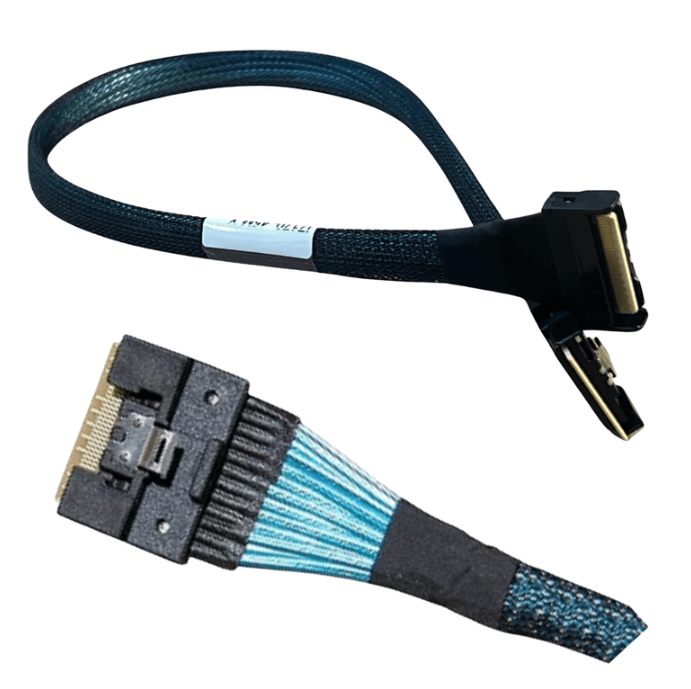
SlimSAS connectors are protocol agnostic at the physical level. They can carry SAS, SATA, or PCIe signals depending on how the port is wired and what cable is used.
For PCIe Gen 4.0 operation, all of the following must align:
-
The host controller or motherboard must support PCIe signaling on the SlimSAS port
-
The backplane or target device must accept PCIe lanes
-
The cable must be explicitly rated for PCIe Gen 4 speeds
-
Lane counts must match end to end
If any one of these elements is SAS-only or Gen 3 limited, the link will not operate as expected.
SlimSAS 4i vs SlimSAS 8i Compatibility Considerations
SlimSAS is available in multiple lane configurations, most commonly 4i and 8i.
Key differences include:
-
SlimSAS 4i supports four PCIe lanes
-
SlimSAS 8i supports eight PCIe lanes
-
Lane count directly affects total bandwidth
-
Ports and cables are keyed differently and are not interchangeable
A SlimSAS 8i cable cannot be used in a 4i port, and using the wrong cable will result in detection failure or no link at all.
Cable Rating Matters More than the Connector
One of the most common compatibility mistakes is assuming that a SlimSAS cable designed for SAS will also work for PCIe.
PCIe Gen 4 operates at 16 GT per second per lane and requires:
-
Lower insertion loss
-
Tighter impedance control
-
Better shielding and crosstalk suppression
A SlimSAS SAS cable may physically fit but often lacks the electrical performance needed for PCIe Gen 4, leading to link instability or fallback to lower speeds.
Motherboard and Backplane Documentation Must be Verified
Not all SlimSAS ports support PCIe, even on modern platforms.
Before designing or installing a system:
-
Confirm whether the SlimSAS port is PCIe capable or SAS-only
-
Check whether the port supports x4 or x8 PCIe
-
Verify whether firmware or BIOS settings control protocol selection
-
Ensure the backplane routes PCIe lanes correctly
Relying on connector appearance alone is a common cause of compatibility issues.
Cable Length and Routing Affect Gen 4 Stability
Even with the correct cable and port configuration, physical layout plays a major role.
Best practices include:
-
Keeping passive SlimSAS cable runs as short as possible
-
Avoiding tight bends and sharp routing transitions
-
Keeping data cables away from power delivery paths
-
Avoiding tight bundling that increases crosstalk
As cable length increases, signal margin decreases, making Gen 4 operation less reliable.
SlimSAS Works Best in Backplane Based Designs
SlimSAS is particularly effective when used with properly designed backplanes that manage lane routing and signal conditioning.
Direct point to point SlimSAS connections can work, but backplanes often provide:
-
Cleaner lane mapping
-
Better mechanical alignment
-
Improved signal integrity control
This is why SlimSAS is common in NVMe drive bays and modular storage systems.
Common Symptoms of SlimSAS Gen 4 Compatibility Problems
When SlimSAS compatibility is not correct, issues often appear as:
-
Devices training at Gen 3 instead of Gen 4
-
Intermittent detection or dropouts
-
CRC or link errors under load
-
Performance that degrades over time or temperature
These symptoms are frequently misattributed to firmware or device faults when the root cause is cabling or routing.
When SlimSAS is the Right Choice for PCIe Gen 4
SlimSAS is a strong option for PCIe Gen 4 systems when:
-
Moderate to high lane density is required
-
Cable lengths are short and controlled
-
Backplanes are designed for PCIe
-
Future Gen 5 compatibility is desirable
For very high density or next generation platforms, MCIO may offer additional headroom, but SlimSAS remains widely used and effective.
Practical Takeaway
SlimSAS is compatible with PCIe Gen 4.0, but only when the entire signal path is designed and validated for Gen 4 operation. Connector type alone does not guarantee compatibility. Cable quality, lane count, port configuration, routing discipline, and documentation verification all determine whether a SlimSAS based PCIe Gen 4 link will be stable and performant.
FAQ (Frequently Asked Questions)
Is SlimSAS inherently PCIe Gen 4 capable?
The connector is capable, but actual compatibility depends on cable rating and system design.
Can a SlimSAS SAS cable be used for PCIe?
No. SAS cables are not designed to meet PCIe Gen 4 electrical requirements.
Does SlimSAS support PCIe Gen 5?
Some SlimSAS implementations are Gen 5 capable, but cable quality and length limits become even more critical.
Why does my SlimSAS link fall back to Gen 3?
This usually indicates signal integrity issues caused by cable quality, length, or routing.